3D exhibition stand generator
Generate a 3D exhibition stand you can edit
Start with the stand size, open sides and what visitors need to do. Studio turns your brief and brand website into a complete 3D layout, so you can check the space before making changes and preparing a builder's brief.
5 free credits · no card needed
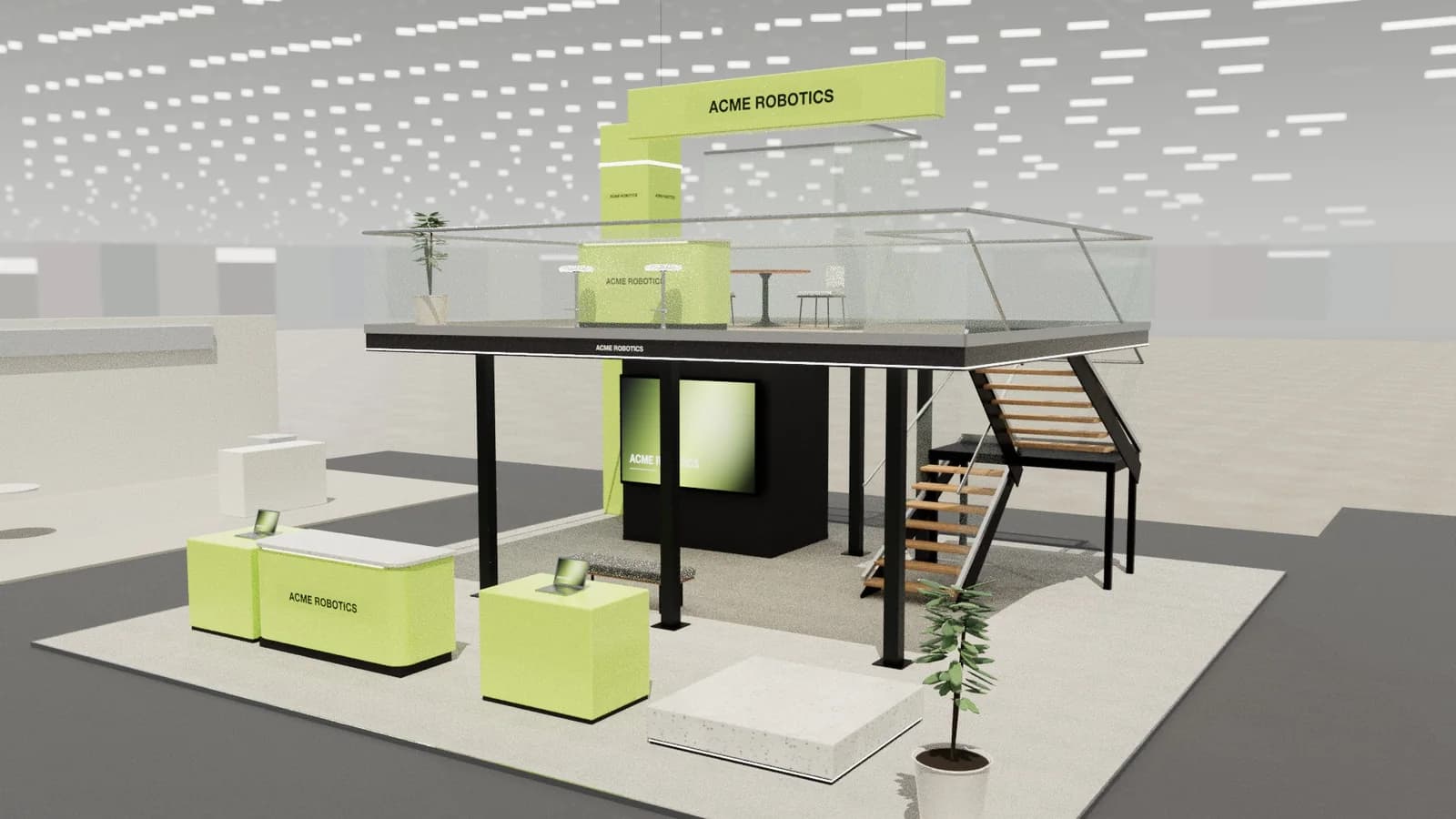 10 × 10 m · double-deck island
Brief
acme-robotics.com
Photoreal render
Show day · 2K
Create renderIn short
A 3D exhibition stand generator turns a written brief into a three-dimensional booth layout. ExhibitionBase Studio creates an editable concept with walls, counters, displays and furniture at the dimensions you enter. You can inspect the stand from different angles, move and resize objects, create photoreal renders, and export the same design as CAD drawings or a GLB/OBJ model. It is a concept-design tool; structural engineering and venue approval remain with your builder and organiser.
3D stand generator
What you get.
Geometry you can change
The result is a 3D scene with separate objects, rather than a flat image. Move a counter, resize a wall or add seating and inspect the updated layout from another angle.
Your plot, your open sides
Enter width, depth, maximum height and a row, corner, peninsula or island position. Studio supports footprints up to 900 m² (2 to 60 metres a side) and heights up to 8 metres.
Three directions to compare
One concept request costs 5 Studio credits and produces three alternatives. Compare the product display, visitor route and meeting area before refining one.
A brand-specific starting point
Add the public brand website and a logo. Studio reads the company's colours and offer to inform the design; review the extracted brief before generating.
Renders and drawings from one design
Use the model for photoreal visualisation, then download plans, elevations and a schedule. The model and CAD exports carry the dimensions; AI renders can vary small visual details.
Continue in your own tools
Download a GLB or OBJ model, layered DXF in millimetres, PDF drawings or SVG sheets. Check dimensions and fabrication details with your stand builder before construction.
How it works
Three steps, no CAD skills needed.
- 01
Describe the job
For example: a 6 × 6 m corner stand, 4 m maximum height, two product demos, a four-person meeting table and enclosed storage. Add the brand website and the organiser's restrictions.
- 02
Check and edit
Generate the design. Check the entrances, clear routes, product visibility and seating, then move or resize objects in the 3D scene. Manual editing is free.
- 03
Present and hand over
Create a render for approval, share a 3D review link and export the drawing pack. Ask the builder to confirm structure, materials, services, accessibility and venue compliance.
Goes in
What Studio uses
- Stand width, depth and height
- Open sides
- Brand website and logo
- Product and meeting needs
- Written or PDF brief
- Venue restrictions
Comes out
What you get back
- An editable 3D stand design
- Photoreal renders
- Plan and elevations
- Layered AutoCAD DXF
- GLB and OBJ models
- PDF drawing pack
- DXF
AutoCAD, BricsCAD, DraftSight
- PDF
A3 drawing pack with render
- SVG
Plan & elevation sheets
- CSV
Object schedule for quoting
- GLB
Blender, Unreal, web viewers
- OBJ
Rhino, 3ds Max, Cinema 4D
- WEBP
1K or 2K renders
- MP4
Walkthrough, reveal or orbit video
FAQ
Good to know.
01Is this a 3D model generator or an AI image generator?
Studio generates an editable 3D scene first. Rendering is a separate action that creates an image from the chosen scene and camera. Use the 3D model and drawings for dimension checks, and the render for visual presentation.
02Can it generate exhibition stand ideas from a short brief?
Yes. Include the plot dimensions, open sides, brand and the activities the stand must support. You can generate a fresh design at any time for another direction. A specific brief is more useful than asking only for a modern or impressive booth.
03Can I start with a ready-made stand instead?
Yes. Studio has 25 stand templates with visible layouts and specifications. Starting from a template uses 1 Studio credit; resizing and manual editing afterwards are free.
04Is the exhibition stand generator free to try?
A new workspace receives 5 starter credits once. An AI stand design costs 5 and a standard render costs 5. More credits are one-time purchases, with no subscription.
05Can a stand builder build from these designs?
Studio produces dimension-controlled concept designs with plans, elevations and a schedule that are accurate to the 3D model, which is ideal for pitching, quoting and planning. Structure, rigging, electrics, fire safety and venue approvals still need your stand builder and the organiser.
More in Studio
Keep going.
Your next stand
Design the stand before the client asks twice.
Start with 5 free credits: enough for a complete AI stand design. Editing, drawings and exports are always free.
